How to Integrate Pabau with SignatureRx
How to Integrate Pabau with SignatureRx
This article walks you through how to integrate your Pabau account with SignatureRx, so you can start sending prescriptions digitally with ease.
Step 1: Navigate to Labs & Pharmacies
Start by logging into your Pabau account using your login credentials. Then navigate to the Setup page located on the bottom right corner of the screen. Then, click on the "Labs & Pharmacies" tab located under the "Developer & Other" section.
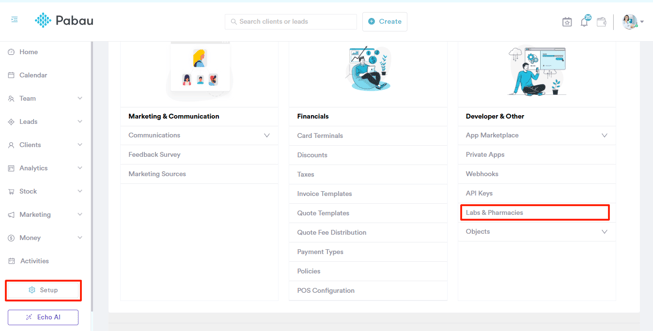
Step 2: Set Up Signature RX
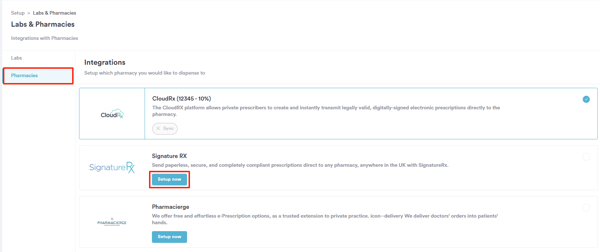
On the Labs & Pharmacies page, initially, select the "Pharmacies" tab on the top right corner of the screen. You’ll see a list of all available pharmacies you can integrate with Pabau. To connect SignatureRx, simply click the “Setup now” button next to the SignatureRx option to get started.
A pop-up window will appear prompting you to enter the source code, which is your CLINIC ID. You’ll also see a slider to set a markup fee, giving you the option to add a percentage-based charge to prescriptions if you choose to.
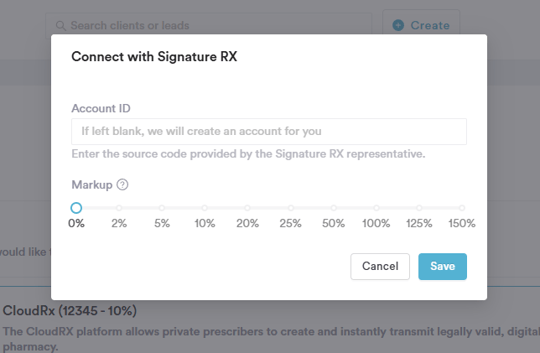
To finalize, click the "Save" button in the bottom right corner of the pop-up. By following these steps, you will successfully integrate SignatureRx to your Pabau account.
Related Articles
Can You Integrate With Our System
Can You Integrate With Our System Yes, SignatureRx offers several integration options so you can generate e-prescriptions directly from the systems you already use. Semble Integration SignatureRx integrates with Semble, allowing prescribers to create ...Jelly Software Integration With SignatureRx
Jelly Software Integration With SignatureRx Jelly Software integrates with SignatureRx to give your patients a simple way to take their prescription to any local pharmacy. SignatureRx provides secure digital health records and electronic private ...Carebit Integration With SignatureRx
Carebit Integration With SignatureRx The Carebit integration allows clinicians to send prescriptions directly from Carebit to SignatureRx. Patients then receive their prescription code by email and SMS, which they can use at any local pharmacy or ...Semble Integration With SignatureRx
Semble Integration With SignatureRx With the Semble integration, you can submit patient prescriptions directly to SignatureRx from within Semble. Make sure your Semble role includes editing permissions for Lab and pharmacy settings before you begin. ...Are SignatureRx Prescriptions Compliant
Are SignatureRx Prescriptions Compliant Yes, SignatureRx e-prescriptions are fully compliant with UK regulations. They follow the same regulatory framework used by the NHS Electronic Prescriptions Service. How SignatureRx Meets Legal Requirements ...