How to Use Your SignatureRx Prescription ID
How to Use Your SignatureRx Prescription ID
Learn what a prescription ID is and how to use it to collect your medication from a pharmacy or request delivery.
What Is a Prescription ID?
A prescription ID is a unique code generated when your prescriber issues a prescription through SignatureRx.
This code allows a pharmacy to securely access and dispense your medication.
How You Receive Your Prescription ID
Once your prescription has been issued, you will receive your prescription ID via:
- SMS (text message)
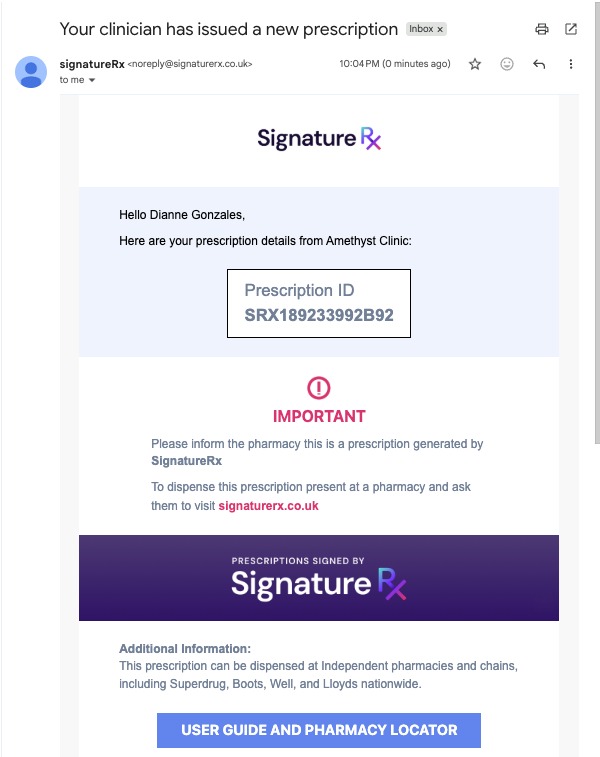
How to Use Your Prescription ID
You can use your prescription ID in the following ways:
- At your local pharmacy: Present your prescription ID at any UK pharmacy to collect your medication
- For delivery: Click "DELIVER MY PRESCRIPTION" in the email you received from us
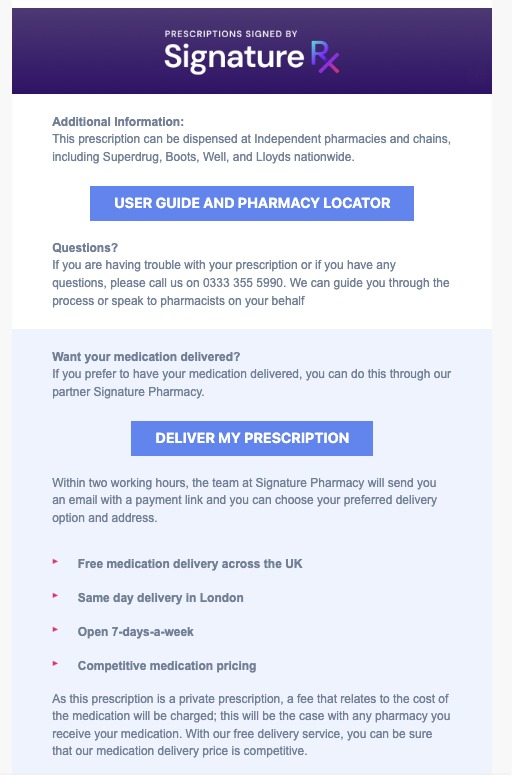
Important Information
- Your prescription ID is unique and can only be used once
- Once dispensed, the same prescription ID cannot be reused at another pharmacy
- Keep your prescription ID safe and only share it with a pharmacy
Using Your Prescription ID to Collect a Prescription
Overview
This article explains what a SignatureRx Prescription ID is, which pharmacies accept it, and the steps to collect your medication from a pharmacy of your choice.
Who does this apply to?
Patients who have received a private prescription through SignatureRx and want to collect it in person.
Key points
- A Prescription ID is a unique code sent to you by email or SMS once your prescriber issues your prescription.
- You can collect your prescription at any UK pharmacy, including large chains (e.g. Boots, Well Pharmacy, Tesco, Morrisons, Superdrug, Lloyds) and independents, across England, Scotland, Wales, or Northern Ireland.
- Your Prescription ID can only be used once — after it's dispensed at one pharmacy, it cannot be used again elsewhere.
1. What is a Prescription ID and how do I get one?
Answer: A unique code generated when your prescriber issues your prescription, sent by email or SMS.
This code allows a pharmacy to securely access and dispense your medication.
2. Which pharmacies can I use?
Answer: Any UK pharmacy of your choice.
Pharmacies retrieve and dispense your prescription directly through the SignatureRx system. You pay the pharmacy directly, and they dispense your medication. If one pharmacy cannot process it, you can try another or request delivery via Signature Pharmacy instead.
3. How do I collect my prescription at a pharmacy?
Answer: Provide your Prescription ID and date of birth to the pharmacist.
- Check your email or SMS for your Prescription ID
- Visit any UK pharmacy of your choice
- Provide your Prescription ID and date of birth to the pharmacist
- The pharmacist retrieves your prescription securely through SignatureRx
- Once processed, you will receive your medication
4. Can I get it delivered instead?
Answer: Yes, by clicking "DELIVER MY PRESCRIPTION" in your email.
If you prefer not to visit a pharmacy, click "Deliver my prescription" in the email you received to arrange delivery instead.
Source links:
https://help.signaturerx.co.uk/portal/en/kb/articles/which-pharmacies-accept-signaturerx-prescriptions
https://help.signaturerx.co.uk/portal/en/kb/articles/how-to-use-your-signaturerx-prescription-id
https://help.signaturerx.co.uk/portal/en/kb/articles/how-to-collect-your-prescription-from-a-pharmacy