How SignatureRx Works for Pharmacies
How SignatureRx Works for Pharmacies
SignatureRx is an advanced electronic private prescription system that enables clinicians and telemedicine providers to issue paperless, secure, and fully compliant prescriptions to pharmacies across the UK. This guide explains how SignatureRx works from a pharmacy perspective and how to access and dispense prescriptions.
1. SignatureRx allows prescriptions to be:
- Issued digitally by clinicians
- Accessed securely by pharmacies
- Dispensed without the need for paper prescriptions
Patients do not present a paper prescription—instead, they provide:
- A Prescription ID, and
- Their date of birth (DOB)
2. Accessing a Prescription
To retrieve a prescription:
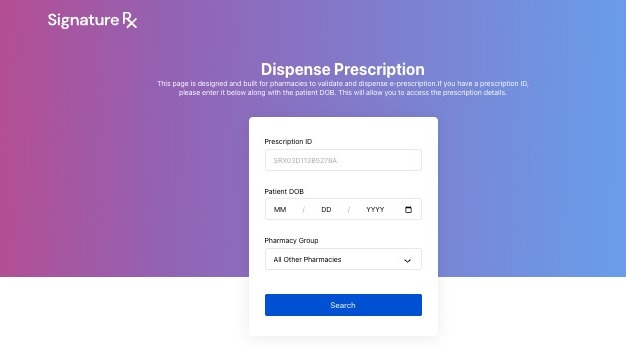
- Go to: https://signaturerx.co.uk/
- Click “Dispense Prescription”
- Enter:
- Prescription ID
- Patient date of birth
- Select your Pharmacy Group
- Click Search
If the details match, the prescription will appear on screen.
3. Before Dispensing
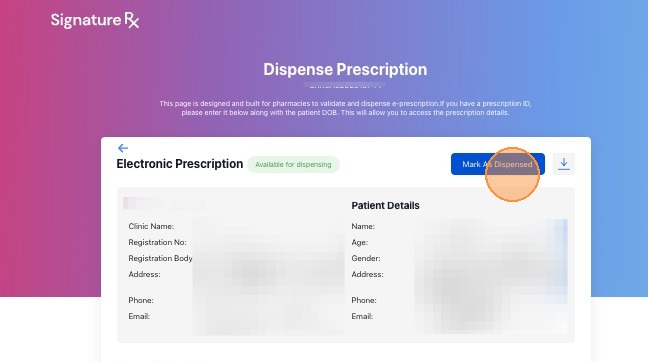
Check the prescription status:
Available for dispensing → Safe to proceed
Do NOT dispense if status is:
- Voided
- Expired
- Already dispensed
4. Dispensing the Prescription
- Download and review the prescription
- Prepare the medication
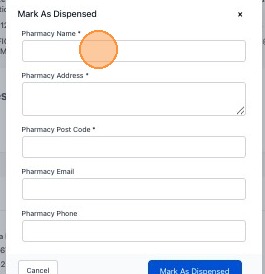
- Complete all required fields
- Click “Mark As Dispensed”
Only mark as dispensed once the medication is ready for collection or delivery.
After Dispensing
- The prescription is marked as complete
- It cannot be dispensed again by another pharmacy
- A secure audit trail is created
Key Benefits for Pharmacies
- Paperless workflow – no physical prescriptions required
- Secure access – prescriptions retrieved using unique patient details
- Nationwide coverage – prescriptions can be dispensed at any UK pharmacy
- Improved efficiency – faster dispensing and reduced errors
How SignatureRx Works for Pharmacies
Overview
This article explains how SignatureRx works from a pharmacy's perspective, including how to access, verify, and dispense a prescription.
Who does this apply to?
Pharmacy staff dispensing SignatureRx prescriptions. (Note: this article was found listed under the Patient section, but its content is written for pharmacy staff rather than patients.)
Key points
- Prescriptions are issued digitally and accessed by pharmacies using the patient's Prescription ID and date of birth, with no paper prescription required.
- Before dispensing, pharmacy staff must check the prescription status and must not dispense if it is Voided, Expired, or Already Dispensed.
- Once marked as dispensed, a prescription is locked and cannot be dispensed again at another pharmacy.
1. How does a pharmacy access a prescription?
Answer: Via signaturerx.co.uk, using the Prescription ID and patient date of birth.
Go to signaturerx.co.uk, click "Dispense Prescription", enter the Prescription ID and patient date of birth, select the Pharmacy Group, and click Search. If the details match, the prescription appears on screen.
2. What should be checked before dispensing?
Answer: The prescription status must show it's available for dispensing.
Proceed only if the status shows "Available for dispensing." Do not dispense if the status is Voided, Expired, or Already dispensed.
3. How is a prescription marked as dispensed?
Answer: By downloading, reviewing, preparing the medication, and clicking "Mark As Dispensed".
Download and review the prescription, prepare the medication, complete all required fields, and click "Mark As Dispensed" only once the medication is ready for collection or delivery. After this, the prescription is complete, cannot be dispensed again elsewhere, and a secure audit trail is created.
Source link:
https://help.signaturerx.co.uk/portal/en/kb/articles/how-signaturerx-works-for-pharmacies
Related Articles
Which Pharmacies Accept SignatureRx Prescriptions?
Which Pharmacies Accept SignatureRx Prescriptions? SignatureRx prescriptions are electronic private prescriptions that can be accessed by pharmacies using your prescription ID and date of birth. You can collect your SignatureRx prescription from any ...Welcome to SignatureRx
Welcome to SignatureRx Learn how to get started with SignatureRx, an advanced electronic private prescription platform designed for clinicians and telemedicine providers. SignatureRx allows prescribers to issue secure, paperless private prescriptions ...Integrating Pabau With SignatureRx
Integrating Pabau With SignatureRx Learn how to seamlessly connect your Pabau account with SignatureRx for streamlined prescription management. This guide provides step-by-step instructions to help you navigate the integration settings and ...Is a SignatureRx e-prescription legally valid?
Is a SignatureRx e-prescription legally valid? Prescriptions issued via SignatureRx are fully compliant with UK regulations and are legally valid private prescriptions. How SignatureRx Ensures Compliance SignatureRx follows the same regulatory ...Can You Integrate With Our System?
Accessing SignatureRx REST API Documentation Learn how to locate the official REST API documentation to integrate SignatureRx into your custom workflows. This guide provides a direct path to finding the resources needed for seamless system ...