Integrating Pabau With SignatureRx
Integrating Pabau With SignatureRx
Learn how to seamlessly connect your Pabau account with SignatureRx for streamlined prescription management. This guide provides step-by-step instructions to help you navigate the integration settings and configuration process efficiently.
1. Navigate to Labs & Pharmacies
Start by logging into your Pabau account using your login credentials. Then navigate to the Setup page located on the bottom right corner of the screen. Then, click on the "Labs & Pharmacies" tab located under the "Developer & Other" section.
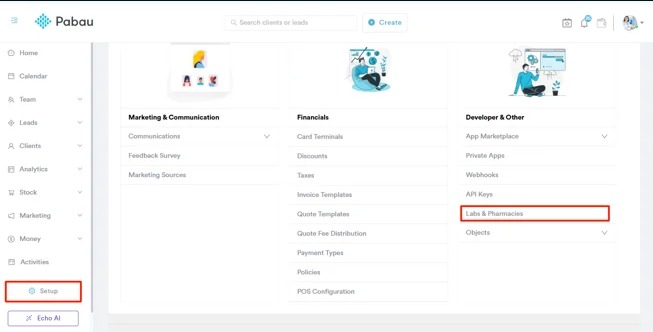
2. Set Up Signature RX
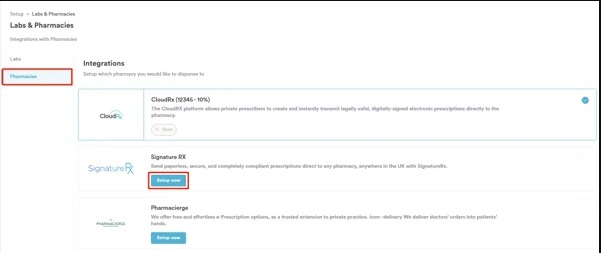
On the Labs & Pharmacies page, initially, select the "Pharmacies" tab on the top right corner of the screen. You’ll see a list of all available pharmacies you can integrate with Pabau. To connect SignatureRx, simply click the “Setup now” button next to the SignatureRx option to get started.
3. A pop-up window will appear, prompting you to enter the source code, which is your clinic ID (this can be found on your SignatureRx dashboard). You will also see a slider to set a markup fee, allowing you to add a percentage-based charge to prescriptions if required.
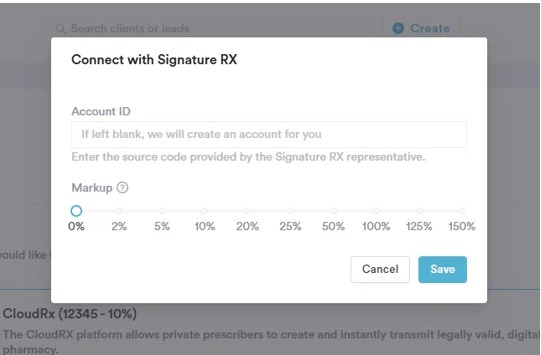
4. To finalize, click the "Save" button in the bottom right corner of the pop-up. By following these steps, you will successfully integrate SignatureRx to your Pabau account.
Related Articles
Integrating Carebit With SignatureRx
Integrating Carebit With SignatureRx Learn how to seamlessly connect your Carebit account with SignatureRx to streamline your clinical workflow. This guide provides step-by-step instructions for setup and configuring your account to send digital ...Integrating Semble With SignatureRx
Integrating Semble With SignatureRx Learn how to effectively link your Semble account with SignatureRx for streamlined electronic prescribing. This guide walks you through the essential configuration steps to ensure seamless communication between ...Integrating Cliniko With SignatureRx
Integrating Cliniko With SignatureRx Learn how to seamlessly connect your Cliniko account with SignatureRx to streamline your clinical workflow. This guide walks you through locating integration settings, generating your API key, and finalizing the ...Integrating Jelly Software With SignatureRx
Integrating Jelly Software With SignatureRx This guide provides a walkthrough for connecting Jelly Software with your SignatureRx account to streamline your prescription workflow. By following these steps, you will learn how to configure integration ...Integrating Hero Health and EMIS Web With SignatureRx
Hero Health and EMIS Web Integration With SignatureRx Hero Health has partnered with SignatureRx to allow private prescriptions to be generated directly from your Hero account. Prescriptions issued in EMIS Web can be pulled into Hero and sent to ...