New: Dashboard Warning Banner
New: Dashboard Warning Banner
When you log in, SignatureRx now shows an orange banner at the top of your dashboard if there are prescriptions still awaiting their original paper CD prescription. This makes it impossible to miss outstanding items.
Prescribers see a count of their own outstanding prescriptions. Clinic Admins see the clinic-wide total.
What the banner looks like:
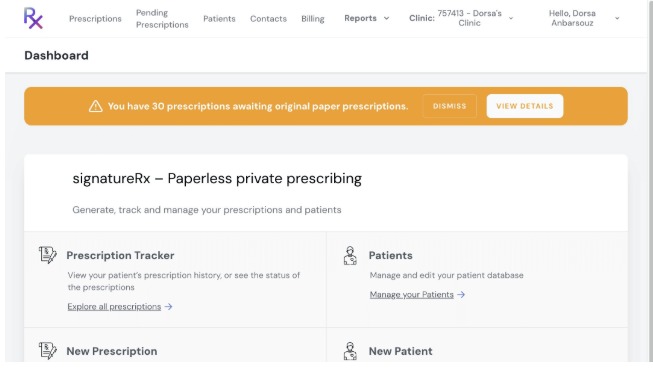
The orange banner appears at the top of the Dashboard when originals are outstanding.
💡 Tip: Clicking "View Details" takes you directly to the FP10CD Prescriptions report filtered to "Waiting for Original" status, saving you several clicks.
How to use it
Log in to SignatureRx. If any prescriptions are awaiting original paper CDs, the orange banner appears automatically.
Click "View Details" to go directly to the FP10CD report filtered to show outstanding items.
Alternatively, click "Dismiss" to hide the banner temporarily. It will reappear on your next login if items remain outstanding.
Related Articles
New: Dashboard Warning Banner
New: Dashboard Warning Banner Made by Dianne Micah Gonzales with Scribe When you log in, SignatureRx now shows an orange banner at the top of your dashboard if there are prescriptions still awaiting their original paper CD prescription. This makes it ...New: Waiting for Original Reminder Frequency
New: Waiting for Original Reminder Frequency Made by Dianne Micah Gonzales with Scribe Click "Profile" Scroll down to "Reminder Frequency for FP10CD Awaiting Originals, and here you can configure how often you receive reminder emails for ...Navigating The SignatureRX Clinic Dashboard (Overview)
Navigating The SignatureRX Clinic Dashboard (Overview) This guide provides an overview of the SignatureRx clinic dashboard. It covers the key areas available to help you manage prescriptions, prescribers, patients, billing, and clinic settings ...New: Bulk Prescription Management
New: Bulk Prescription Management Made by Dianne Micah Gonzales with Scribe You can now select multiple prescriptions from the list and perform bulk actions. This is particularly useful when using the pre-paid envelope process, as you can select all ...New: Bulk Prescription Management
New: Bulk Prescription Management Made by Dianne Micah Gonzales with Scribe You can now select multiple prescriptions from the list and perform bulk actions. This is particularly useful when using the pre-paid envelope process, as you can select all ...