New: Waiting for Original Reminder Frequency
New: Waiting for Original Reminder Frequency
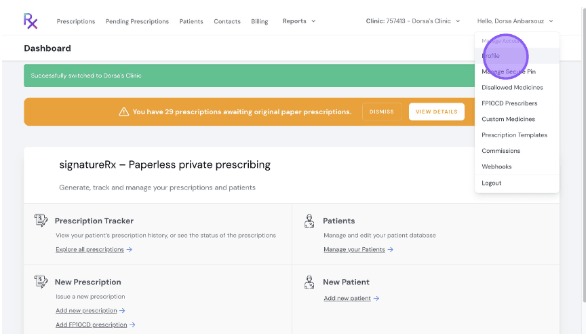
Click "Profile"
Scroll down to "Reminder Frequency for FP10CD Awaiting Originals, and here you can configure how often you receive reminder emails for prescriptions you have written and are awaiting original.
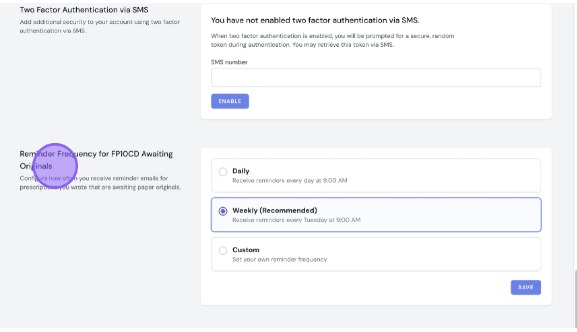
Waiting for Original Reminders
Overview
This article explains how to configure reminder email frequency for FP10CD prescriptions awaiting their original paper copy, and describes the dashboard banner that flags outstanding originals.
Who does this apply to?
Prescribers and Clinic Admins who issue FP10CD controlled drug prescriptions.
Key points
- Reminder email frequency for FP10CD originals is configurable in Profile settings.
- An orange dashboard banner appears automatically when originals are outstanding.
- The banner can be dismissed but reappears at next login if items remain outstanding.
1. How do I change my reminder frequency?
Answer: Update it from your Profile page.
Click "Profile", then scroll down to "Reminder Frequency for FP10CD Awaiting Originals" to configure how often you receive reminder emails for prescriptions awaiting their original.
2. What does the dashboard warning banner show?
Answer: A count of outstanding FP10CD prescriptions awaiting their original.
Prescribers see a count of their own outstanding prescriptions; Clinic Admins see the clinic-wide total. Clicking "View Details" takes you directly to the FP10CD report filtered to "Waiting for Original" status.
3. How do I use the banner?
Answer: Click "View Details" or dismiss it.
Log in to SignatureRx — if prescriptions are awaiting original paper CDs, the banner appears automatically at the top of the dashboard. Click "View Details" to go to the filtered report, or click "Dismiss" to hide it temporarily.
Source links:
https://help.signaturerx.co.uk/portal/en/kb/articles/new-waiting-for-original-reminder-frequency
https://help.signaturerx.co.uk/portal/en/kb/articles/new-dashboard-warning-banner
Related Articles
New: Dashboard Warning Banner
New: Dashboard Warning Banner Made by Dianne Micah Gonzales with Scribe When you log in, SignatureRx now shows an orange banner at the top of your dashboard if there are prescriptions still awaiting their original paper CD prescription. This makes it ...New: Dashboard Warning Banner
New: Dashboard Warning Banner Made by Dianne Micah Gonzales with Scribe When you log in, SignatureRx now shows an orange banner at the top of your dashboard if there are prescriptions still awaiting their original paper CD prescription. This makes it ...New: The FP10CD Prescriptions Report
New: The FP10CD Prescriptions Report Made by Dianne Micah Gonzales with Scribe A new FP10CD tab in Reports gives a clear view of which prescriptions are waiting to arrive at the pharmacy and which have already been received. This is the central place ...New: The FP10CD Prescriptions Report
New: The FP10CD Prescriptions Report Made by Dianne Micah Gonzales with Scribe A new FP10CD tab in Reports gives a clear view of which prescriptions are waiting to arrive at the pharmacy and which have already been received. This is the central place ...New: Bulk Prescription Management
New: Bulk Prescription Management Made by Dianne Micah Gonzales with Scribe You can now select multiple prescriptions from the list and perform bulk actions. This is particularly useful when using the pre-paid envelope process, as you can select all ...