New: The FP10CD Prescriptions Report
New: The FP10CD Prescriptions Report
A new FP10CD tab in Reports gives a clear view of which prescriptions are waiting to arrive at the pharmacy and which have already been received. This is the central place to monitor the status of all paper originals.
Navigating to the report
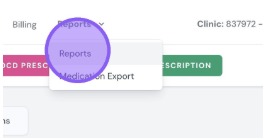
Access Reports via the top navigation bar - click Reports then select Reports from the dropdown.
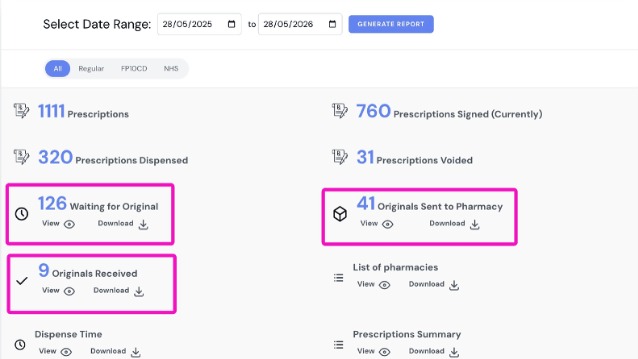
Here you will see 3 new report types, which you are able to view or download as a CSV.
FP10CD Reporting
Overview
This article introduces the FP10CD tab in Reports, which shows which prescriptions are awaiting arrival at the pharmacy and which have already been received.
Who does this apply to?
Clinic users and prescribers who need to track FP10CD paper originals.
Key points
- A dedicated FP10CD tab in Reports centralises tracking of paper originals.
- Three report types are available to view or download as a CSV.
- Accessed via the top navigation Reports menu.
1. How do I access the FP10CD report?
Answer: Via the Reports section in the top navigation bar.
Click "Reports" in the top navigation, then select "Reports" from the dropdown. Here you will see three new report types, which can be viewed or downloaded as a CSV.
Source link:
https://help.signaturerx.co.uk/portal/en/kb/articles/new-the-fp10cd-prescriptions-report
Related Articles
New: The FP10CD Prescriptions Report
New: The FP10CD Prescriptions Report Made by Dianne Micah Gonzales with Scribe A new FP10CD tab in Reports gives a clear view of which prescriptions are waiting to arrive at the pharmacy and which have already been received. This is the central place ...New: Dashboard Warning Banner
New: Dashboard Warning Banner Made by Dianne Micah Gonzales with Scribe When you log in, SignatureRx now shows an orange banner at the top of your dashboard if there are prescriptions still awaiting their original paper CD prescription. This makes it ...New: Dashboard Warning Banner
New: Dashboard Warning Banner Made by Dianne Micah Gonzales with Scribe When you log in, SignatureRx now shows an orange banner at the top of your dashboard if there are prescriptions still awaiting their original paper CD prescription. This makes it ...New: Waiting for Original Reminder Frequency
New: Waiting for Original Reminder Frequency Made by Dianne Micah Gonzales with Scribe Click "Profile" Scroll down to "Reminder Frequency for FP10CD Awaiting Originals, and here you can configure how often you receive reminder emails for ...New: Bulk Prescription Management
New: Bulk Prescription Management Made by Dianne Micah Gonzales with Scribe You can now select multiple prescriptions from the list and perform bulk actions. This is particularly useful when using the pre-paid envelope process, as you can select all ...