How to Validate and Dispense an e-Prescription
How to Validate and Dispense an e-Prescription
This guide explains how pharmacists can validate and safely dispense electronic private prescriptions using SignatureRx.
SignatureRx is an electronic private prescription system that allows prescriptions to be issued digitally and accessed securely by pharmacies.
Before dispensing, pharmacists must complete validation checks to ensure:
- The prescription is valid and authentic
- The medication is safe and appropriate
- The patient and prescriber details are accurate
1. Access the Prescription
- Go to the SignatureRx portal via https://signaturerx.co.uk/
- Click “Dispense Prescription”
- Enter:
- Prescription ID
- Patient date of birth (DOB)
- Select your Pharmacy Group
- Click Search
- Validate the Prescription
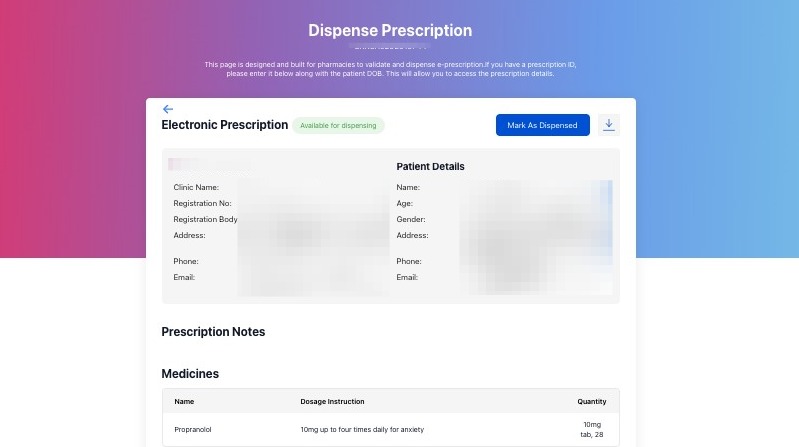
- Before dispensing, complete the following checks:
Prescription Status
Ensure the Prescription is available for dispensing. Do not dispense if status is:
- Voided
- Expired
- Already dispensed
Patient Details
Verify:
- Full name
- Date of birth
These must match the patient presenting at the pharmacy.
Prescriber Details
Validate the prescriber’s credentials:
- Registration number
- Professional registration body (e.g. GMC, GPhC, NMC)
Important:
- The prescriber must be appropriately registered and authorised
- If details are missing or cannot be verified, do not dispense
Prescription Details
Check:
- Medication name
- Strength and dosage
- Quantity
- Directions for use
- Clinical & Safety Checks
As per standard pharmacy practice:
- Check for drug interactions
- Confirm appropriate dosage
- Assess patient suitability if required
8. Dispense the Prescription
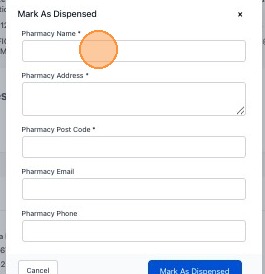
Once all checks are complete, follow the dispensing process:
9. Mark the prescription as dispensed
Why Validation Is Important
Validation ensures:
- Patient safety
- Legal and regulatory compliance
- Accurate dispensing records
- Prevention of fraud or misuse
Tip: Need Help?
If you are unsure about a prescription or unable to validate it, please contact the SignatureRx support team
Related Articles
How to Dispense a Prescription
How to Dispense a Prescription Learn how to quickly locate and process patient prescriptions using the SignatureRX portal. This guide provides a simple walkthrough to help pharmacy staff efficiently input prescription details and search for patient ...Is a SignatureRx e-prescription legally valid?
Is a SignatureRx e-prescription legally valid? Prescriptions issued via SignatureRx are fully compliant with UK regulations and are legally valid private prescriptions. How SignatureRx Ensures Compliance SignatureRx follows the same regulatory ...Issuing Your First e-Prescription – Collection vs Delivery
Issuing Your First e-Prescription – Collection vs Delivery This guide explains how to issue your first electronic prescription using SignatureRx, and how to choose between pharmacy collection and home delivery. When issuing a prescription, you must ...How to Use Your SignatureRx Prescription ID
How to Use Your SignatureRx Prescription ID Learn what a prescription ID is and how to use it to collect your medication from a pharmacy or request delivery. What Is a Prescription ID? A prescription ID is a unique code generated when your prescriber ...View Prescription History
Viewing Prescription History Made by Dianne Micah Gonzales with Scribe Learn how to view a patient’s prescription history in SignatureRx, including previously issued medications and their status. 1. Log into SignatureRx portal using your prescriber ...