New: Paper Prescription Settings
New: Paper Prescription Settings
These settings control whether prescriber and clinic details are automatically printed onto paper prescription forms generated through SignatureRx.
1. Print Prescriber Details on FP10CD (Pink) Forms
When enabled, the system will automatically print the prescriber's details onto FP10CD controlled drug prescription forms, including:
- Prescriber name
- Address
- Telephone number
- Email address
- Registration number
- CD PIN
Turn this off if you are using pre-printed FP10CD stationery that already contains these details, to avoid duplication.

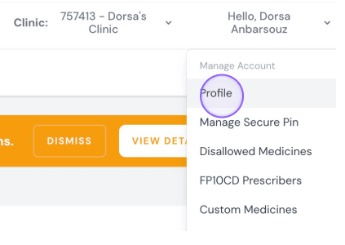
2. This can be found by clicking "Profile"
3. Scroll down to " Prescription Paper Settings", Here you can toggle on and off for FP10CDs and NHS forms.
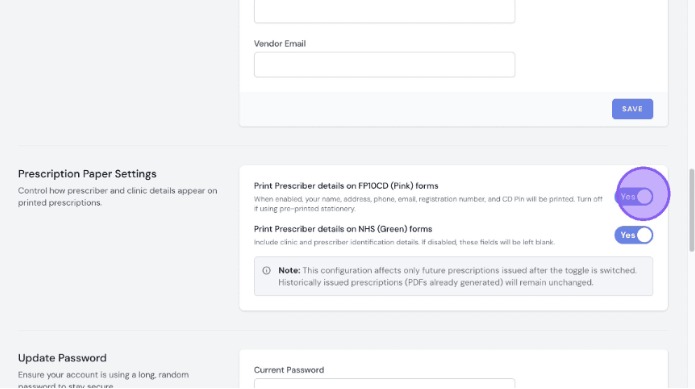
Paper Prescription Settings for FP10CDs : Showing the prescriber’s details on the paper prescription
Overview
This article explains the settings that control whether prescriber and clinic details are automatically printed onto paper prescription forms generated through SignatureRx.
Who does this apply to?
Clinic users and prescribers who print FP10CD (controlled drug) or NHS paper prescription forms.
Key points
- Settings control automatic printing of prescriber and clinic details onto paper forms.
- Applies to FP10CD (pink) controlled drug forms and NHS forms.
- Settings are found under Profile > Prescription Paper Settings.
1. What does the FP10CD printing setting do?
Answer: It automatically prints the prescriber's details onto FP10CD controlled drug forms.
- Prescriber name
- Address
- Telephone number
- Email address
- Registration number
- CD PIN
- Turn this off if using pre-printed FP10CD stationery to avoid duplication.
2. Where do I find these settings?
Answer: Under your Profile page.
Click "Profile", then scroll down to "Prescription Paper Settings" to toggle FP10CD and NHS forms on or off.
Source link:
https://help.signaturerx.co.uk/portal/en/kb/articles/new-paper-prescription-settings
Related Articles
New: Bulk Prescription Management
New: Bulk Prescription Management Made by Dianne Micah Gonzales with Scribe You can now select multiple prescriptions from the list and perform bulk actions. This is particularly useful when using the pre-paid envelope process, as you can select all ...New: Bulk Prescription Management
New: Bulk Prescription Management Made by Dianne Micah Gonzales with Scribe You can now select multiple prescriptions from the list and perform bulk actions. This is particularly useful when using the pre-paid envelope process, as you can select all ...New: Waiting for Original Reminder Frequency
New: Waiting for Original Reminder Frequency Made by Dianne Micah Gonzales with Scribe Click "Profile" Scroll down to "Reminder Frequency for FP10CD Awaiting Originals, and here you can configure how often you receive reminder emails for ...New: Dashboard Warning Banner
New: Dashboard Warning Banner Made by Dianne Micah Gonzales with Scribe When you log in, SignatureRx now shows an orange banner at the top of your dashboard if there are prescriptions still awaiting their original paper CD prescription. This makes it ...New: Dashboard Warning Banner
New: Dashboard Warning Banner Made by Dianne Micah Gonzales with Scribe When you log in, SignatureRx now shows an orange banner at the top of your dashboard if there are prescriptions still awaiting their original paper CD prescription. This makes it ...