Integrating Hero Health and EMIS Web With SignatureRx
Hero Health and EMIS Web Integration With SignatureRx
Hero Health has partnered with SignatureRx to allow private prescriptions to be generated directly from your Hero account. Prescriptions issued in EMIS Web can be pulled into Hero and sent to patients or pharmacies through SignatureRx, making the process seamless from start to finish.
What Are EMIS Web and Hero Health?
EMIS Web
The UK’s leading electronic health record is used by over 4,000 NHS and private GP practices.
Hero Health
A patient engagement platform that supports:
- Online booking
- Patient communications
- Triage
- Invoicing
- Private electronic prescribing for EMIS Web users
Private GPs can use Hero alongside EMIS Web to run streamlined private practice services.
Who Can Use the EMIS Web – SignatureRx Integration
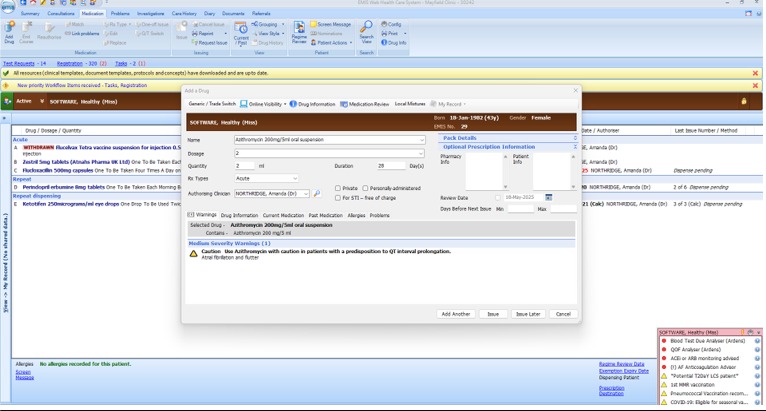
Alert: Prescriptions can be issued during a consultation or through the Medication tab in the patient record.
1. Add a Drug
- Select the drug
- Add dosage and quantity
- Review any alerts
- Tick Private if issuing privately
- Click Issue
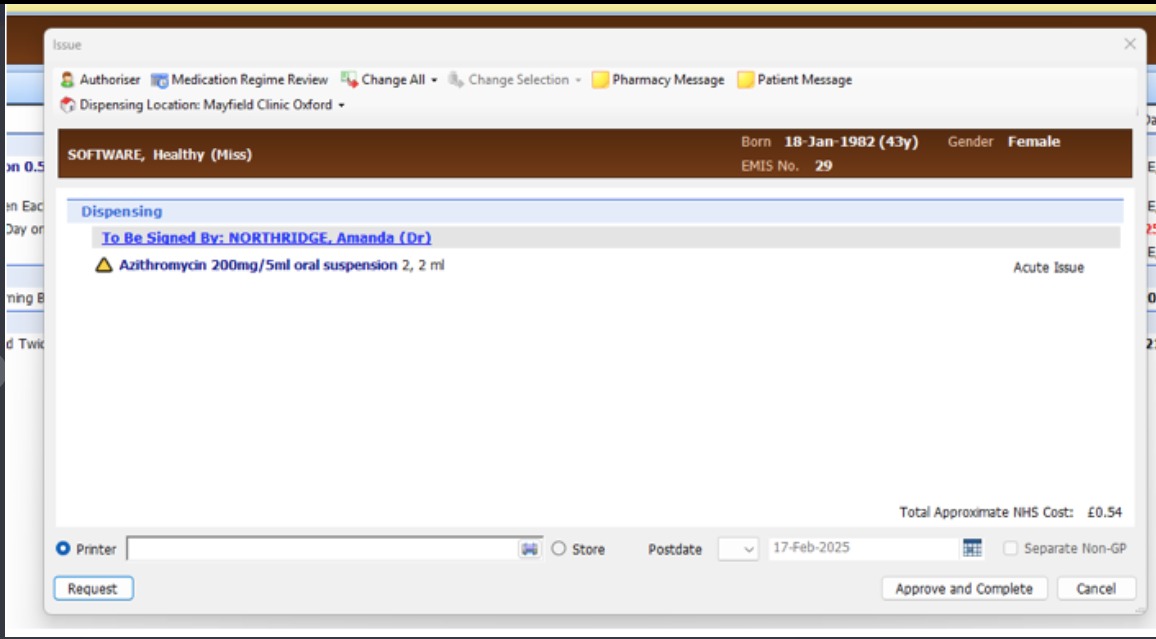
2. Issue the Prescription
- Review
- Approve
- Choose whether to Print or Store
Sending the Prescription Through SignatureRx
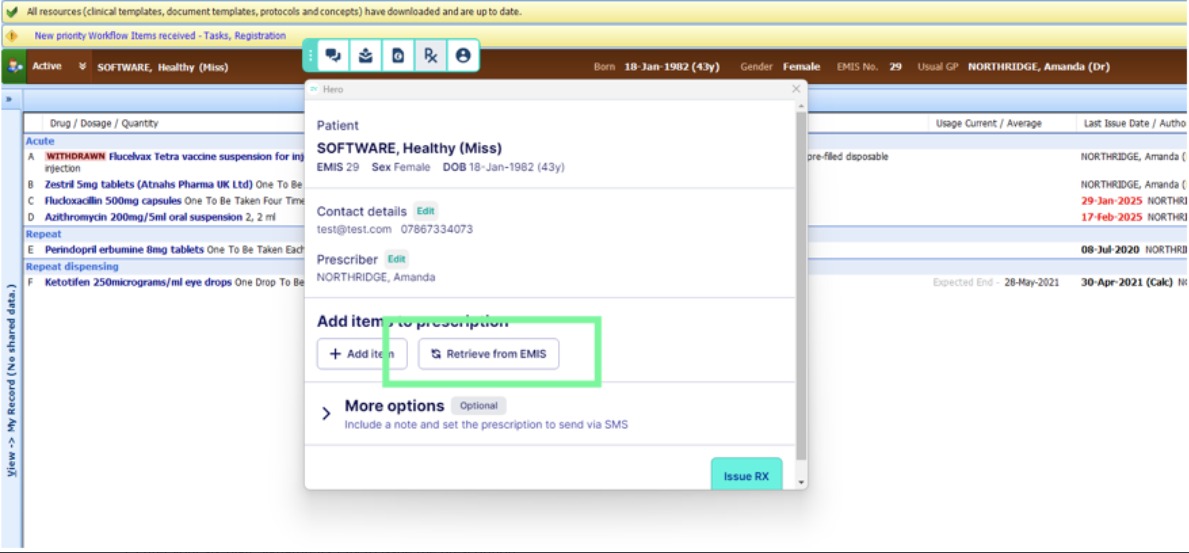
Once the prescription is issued in EMIS Web, you can retrieve it and send it via SignatureRx.
This can be done either through the Hero EMIS toolbar or directly in the Hero browser.
1. Select the Rx option – Hero automatically detects the active patient
2. Click Retrieve from EMIS
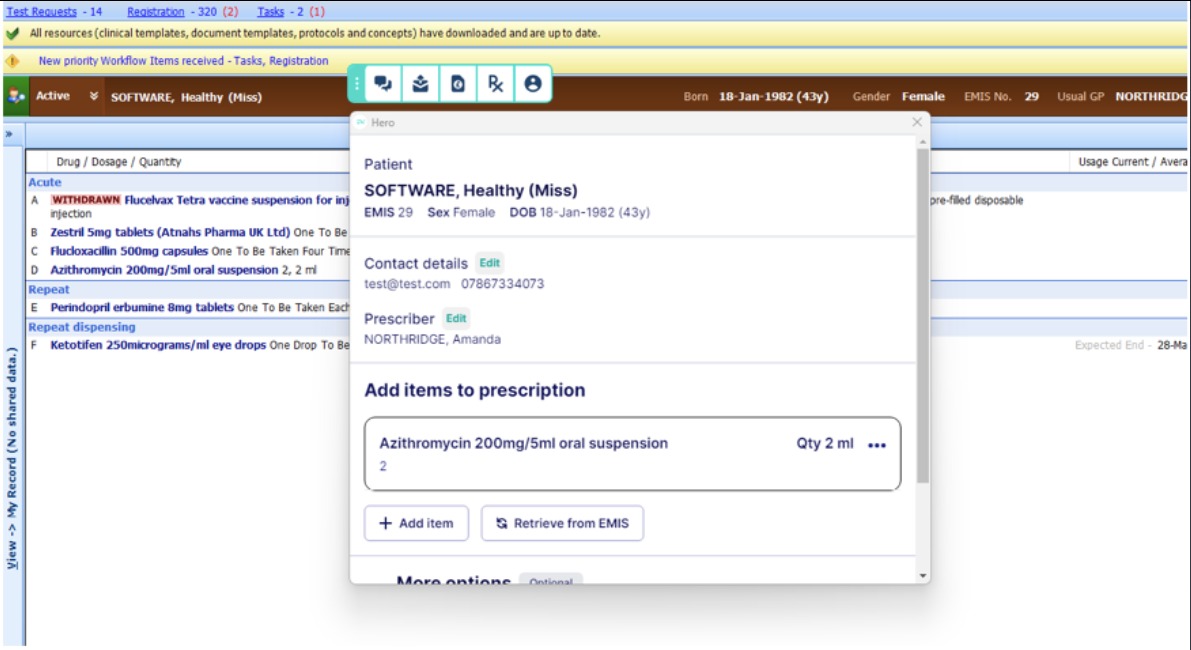
3. Select the issued medication
4. Add the medication
5. Enter your six-digit SignatureRx PIN to issue the prescription
- Collect their prescription at any UK pharmacy using their code
- Or receive the prescription via post
Getting Started With Hero Health and EMIS Web
If you would like to start using Hero’s SignatureRx integration, you can contact the Hero Health team directly.
For additional guidance, you can view Hero’s SignatureRx integration support guide.
A Fully Digital Workflow
With Hero and SignatureRx working together:
- No paper prescriptions are required
- Prescriptions are sent instantly
- Records are stored securely
- You can invoice and collect payment within Hero after issuing
This creates a smooth, modern, and fully digital private prescribing workflow.
Related Articles
Integrating Jelly Software With SignatureRx
Integrating Jelly Software With SignatureRx This guide provides a walkthrough for connecting Jelly Software with your SignatureRx account to streamline your prescription workflow. By following these steps, you will learn how to configure integration ...Integrating Carebit With SignatureRx
Integrating Carebit With SignatureRx Learn how to seamlessly connect your Carebit account with SignatureRx to streamline your clinical workflow. This guide provides step-by-step instructions for setup and configuring your account to send digital ...Integrating Pabau With SignatureRx
Integrating Pabau With SignatureRx Learn how to seamlessly connect your Pabau account with SignatureRx for streamlined prescription management. This guide provides step-by-step instructions to help you navigate the integration settings and ...Integrating Semble With SignatureRx
Integrating Semble With SignatureRx Learn how to effectively link your Semble account with SignatureRx for streamlined electronic prescribing. This guide walks you through the essential configuration steps to ensure seamless communication between ...Integrating Cliniko With SignatureRx
Integrating Cliniko With SignatureRx Learn how to seamlessly connect your Cliniko account with SignatureRx to streamline your clinical workflow. This guide walks you through locating integration settings, generating your API key, and finalizing the ...