Integrating Jelly Software With SignatureRx
Integrating Jelly Software With SignatureRx
This guide provides a walkthrough for connecting Jelly Software with your SignatureRx account to streamline your prescription workflow. By following these steps, you will learn how to configure integration settings, create prescriptions, and understand the automated submission process.
Jelly Software Integration With SignatureRx
Tip: Jelly Software integrates with SignatureRx to give your patients a simple way to take their prescription to any local pharmacy. SignatureRx provides secure digital health records and electronic private prescriptions.
1. Enter Your Integration Code
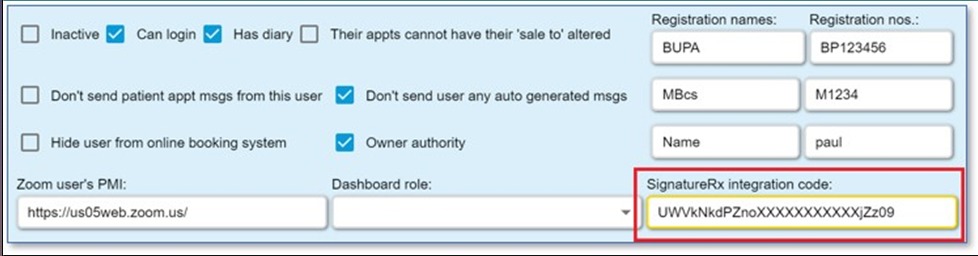
When you create a SignatureRx account, each prescriber receives a unique integration code.
To add this code in Jelly:
- Go to Settings
- Select Users
- Click Edit on the relevant user
- Enter the integration code
This links your Jelly account to SignatureRx.
2. Create a SignatureRx Prescription
To create a new prescription:
- Go to the pharmacy screen
- Click the plus (+) icon
- Select SignatureRx
Tip for Adding Dosage Instructions
After entering a medicine, such as Amoxicillin cap 500mg, add the dosage instructions immediately.
Jelly includes helpful shortcuts:
- Typing t1? expands to “take one”
- Typing tds? expands to “three times daily”
These shortcuts speed up your workflow and ensure clear dosing instructions.
3. Send the Prescription to SignatureRx
When the prescription is ready:
- Open the Send to menu next to the prescription
- Select the appropriate Send to option
- Enter your six-digit PIN when prompted
You will only need to enter your PIN the first time in each session.
What Happens Next
Once submitted:
- The prescription is sent to SignatureRx
- The patient receives the prescription details
- They can take the prescription to any pharmacy in the UK
This makes the process quick, flexible, and convenient for both prescribers and patients.
Related Articles
Integrating Cliniko With SignatureRx
Integrating Cliniko With SignatureRx Learn how to seamlessly connect your Cliniko account with SignatureRx to streamline your clinical workflow. This guide walks you through locating integration settings, generating your API key, and finalizing the ...Integrating Carebit With SignatureRx
Integrating Carebit With SignatureRx Learn how to seamlessly connect your Carebit account with SignatureRx to streamline your clinical workflow. This guide provides step-by-step instructions for setup and configuring your account to send digital ...Integrating Pabau With SignatureRx
Integrating Pabau With SignatureRx Learn how to seamlessly connect your Pabau account with SignatureRx for streamlined prescription management. This guide provides step-by-step instructions to help you navigate the integration settings and ...Integrating Semble With SignatureRx
Integrating Semble With SignatureRx Learn how to effectively link your Semble account with SignatureRx for streamlined electronic prescribing. This guide walks you through the essential configuration steps to ensure seamless communication between ...Integrating Hero Health and EMIS Web With SignatureRx
Hero Health and EMIS Web Integration With SignatureRx Hero Health has partnered with SignatureRx to allow private prescriptions to be generated directly from your Hero account. Prescriptions issued in EMIS Web can be pulled into Hero and sent to ...