Ordering Home Delivery via Signature Pharmacy
Ordering home delivery via Signature Pharmacy – how to request delivery, timelines
Find out how to get your prescription delivered to your home through SignatureRx, including how to request delivery, what happens next, and how long it takes.
1. How to Request Home Delivery
Once your prescription has been issued:
- Check your email or SMS for your prescription notification
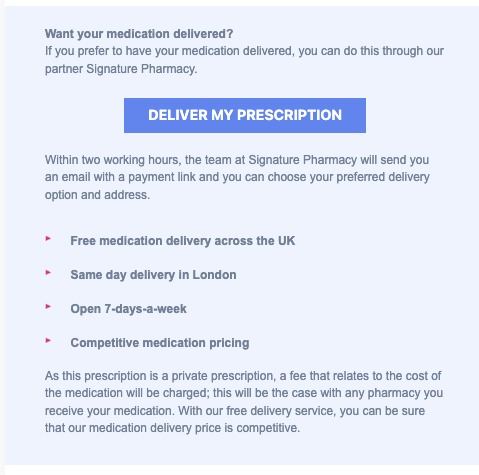
- Click the “Deliver my prescription” button
- Alternatively, enter your Prescription ID and date of birth online
- The pharmacy will contact you with a payment link within 2-working hours.
2. What Happens Next
- Your prescription is sent directly to Signature Pharmacy
- Signature pharmacy will:
- Review and prepare your medication
- Contact you to confirm delivery and payment
- You will receive updates and tracking information once dispatched
3. Delivery Timelines
Delivery times depend on when your order is completed and the delivery option selected.
Next-day delivery is available nationwide
Same-day delivery is available in selected areas
To qualify for same-day or next-day delivery, your order must be approved and paid before the daily cut-off time.
Delivery Cut-Off Times
Weekdays: 4:00 PM
Weekends: 12:00 PM (Saturday may vary depending on courier)
Important:
Orders placed after the cut-off time will be processed on the next working day
Delivery timelines begin only once:
Your prescription has been approved, and
Payment has been completed
Check Same-Day Delivery Availability
Same-day delivery is only available in selected areas.
You can check if it’s available in your area HERE
4. Important Information
- Make sure your contact details and delivery address are correct
- Your prescription must be paid and processed before dispatch
5. Alternative Option: Collect from a Pharmacy
If you prefer, you can take your prescription to a local pharmacy instead. You will need:
- Your Prescription ID
- Your date of birth
6. Need Help?
If you have not received your delivery link or need assistance, please contact Signature Pharmacy at 0330 111 0440.
Ordering Home Delivery via Signature Pharmacy
Overview
This article explains how to request home delivery for a SignatureRx prescription, what happens after requesting it, and the delivery timelines and cut-off times.
Who does this apply to?
Patients who want their prescription delivered to their home via Signature Pharmacy.
Key points
- Delivery can be requested by clicking "Deliver my prescription" in your notification, or by entering your Prescription ID and date of birth online.
- Next-day delivery is available nationwide, and same-day delivery in selected areas, provided your order is approved and paid before the daily cut-off.
- Delivery timelines only begin once your prescription has been approved and paid for.
1. How do I request home delivery?
Answer: Click "Deliver my prescription" in your email or SMS, or enter your details online.
Check your email or SMS for your prescription notification, click the "Deliver my prescription" button, or alternatively enter your Prescription ID and date of birth online. The pharmacy will contact you with a payment link within 2 working hours.
2. What happens after I request delivery?
Answer: Signature Pharmacy reviews, prepares, and contacts you before dispatch.
Your prescription is sent to Signature Pharmacy, who review and prepare your medication and contact you to confirm delivery and payment. You'll receive tracking updates once it's dispatched.
3. What are the delivery timelines and cut-offs?
Answer: Next-day nationwide, same-day in selected areas, subject to daily cut-off times.
Cut-off times are 4:00 PM on weekdays and 12:00 PM on weekends (Saturday may vary by courier). Orders placed after the cut-off are processed the next working day. Delivery timelines only start once your prescription is approved and paid for. Same-day availability can be checked for your specific area.
Source link:
https://help.signaturerx.co.uk/portal/en/kb/articles/ordering-home-delivery-via-signature-pharmacy
Related Articles
Ordering Pre-Paid Returns Envelopes
Ordering Pre-Paid Returns Envelopes Made by Dianne Micah Gonzales with Scribe This guide explains how to order pre-paid returns envelopes for sending FP10CD prescriptions to Signature Pharmacy using SignatureRx. Controlled Drug Pre-Paid Envelopes ...Support – After Receiving Your Order from Signature Pharmacy
Support – After Receiving Your Order from Signature Pharmacy 1. Check Your Order When your medication arrives, please check: The correct medication has been delivered The quantity and dosage match your prescription The package is undamaged and sealed ...How to Track Your SignatureRx Delivery Status
How to Track Your SignatureRx Delivery Status Tracking Your Prescription Delivery Once your prescription has been processed and dispatched by Signature Pharmacy, you will receive: A dispatch confirmation A tracking link via SMS or email How to Track ...Issuing Your First e-Prescription – Collection vs Delivery
Issuing Your First e-Prescription – Collection vs Delivery This guide explains how to issue your first electronic prescription using SignatureRx, and how to choose between pharmacy collection and home delivery. When issuing a prescription, you must ...How to Issue a Prescription for Collection or Delivery
<br> How to Issue a Prescription for Collection or Delivery Learn how to create and issue a new prescription for a patient. This guide covers adding new patients, applying templates, and managing prescription items for ...